 senn-tech
DNS Adblocking Self-Hosted: Pi-hole vs. AdGuard Home
Ad blocking doesn’t happen in the browser, it happens at the DNS level. Both tools, Pi-hole and AdGuard Home; do this reliably, but they differ in details that matter in daily use.
The Principle: DNS Sinkhole
A DNS server that sends requests to known ad and tracking domains into a black hole. The client queries ads.doubleclick.net, and gets back 0.0.0.0. No ads, no tracking, network-wide, for all devices.
Pi-hole
The heavyweight champion. Lightweight, stable, massive community. Setup takes about 10 minutes:
curl -sSL https://install.pi-hole.net | bash
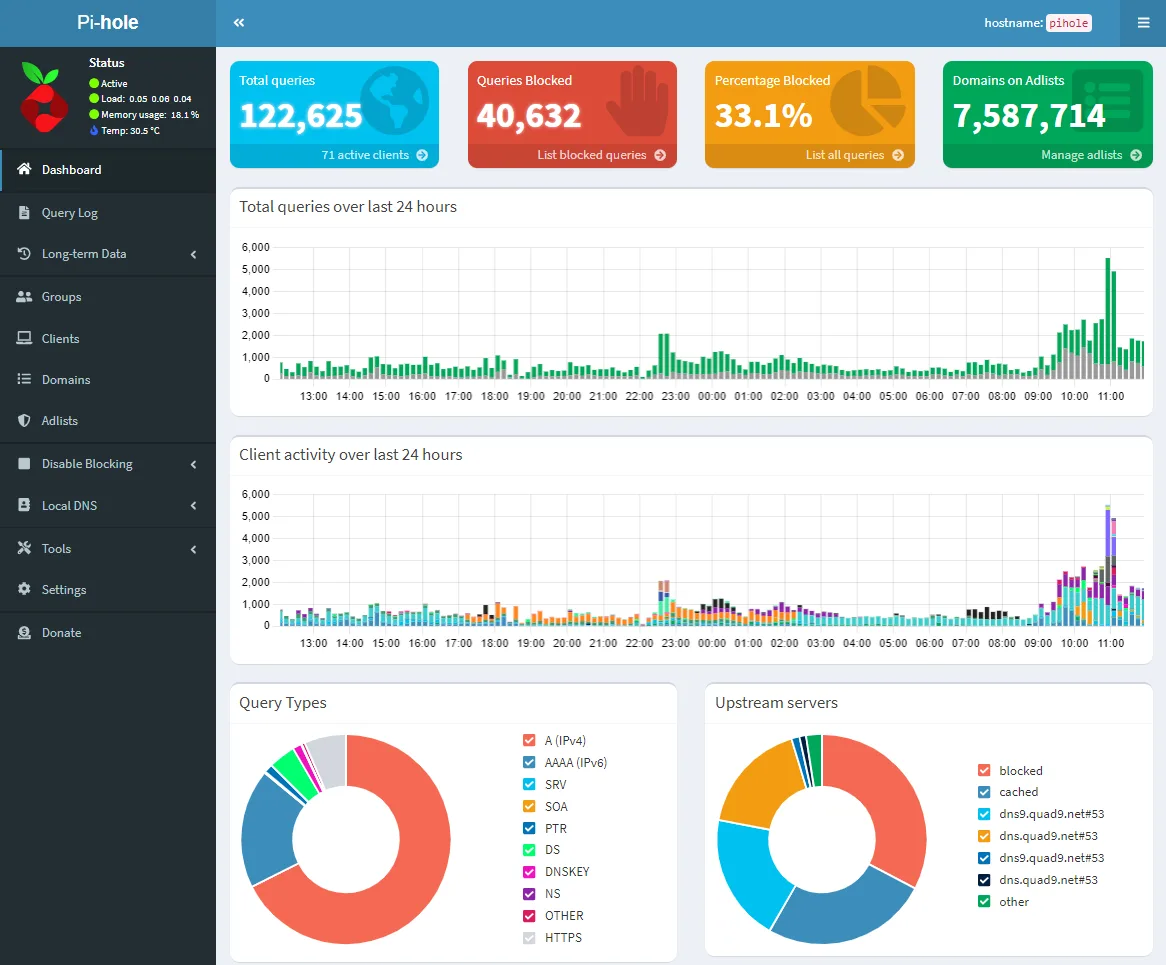
Pi-hole includes a clean web interface, DHCP option, query log, whitelist/blacklist, and groups. Its strength is transparency: you see live which clients are querying which domains, useful for troubleshooting and forensic questions.
For a long time, Pi-hole could only do DoH/DoT via workarounds (e.g., cloudflared), and the interface felt dated from 2018. With Pi-hole v6, that has changed dramatically: the project replaced the old lighttpd/PHP backend with an embedded webserver, added a native REST API, integrated HTTPS/TLS, and introduced a TOML-based configuration. This modernizes exactly the areas where AdGuard Home previously led.
AdGuard Home
AdGuard Home does the same, but has offered DoH/DoT out of the box from the start. Filter list management is comfortable, deployment is simple, Docker image, one command.
docker run -d --name adguardhome -p 53:53/tcp -p 53:53/udp adguard/adguardhome
AdGuard Home can do more than just DNS filtering: it includes a DHCP server, client identification, and a simple but usable parental control feature.
What still makes Pi-hole strong: the sheer volume of documented edge cases. If Pi-hole is running, it keeps running.
Recursive DNS with unbound
To consistently avoid tracking, you can chain a recursive resolver behind the filter: unbound queries root and authoritative servers directly, instead of forwarding requests to Google or Cloudflare. Both tools work seamlessly with unbound; the DNS path then stays entirely within your own network.
Redundancy: DNS Is Critical
A single DNS resolver is a single point of failure; if it goes down, half the network is affected. In production, we therefore run two instances (primary/secondary via DHCP distribution) and keep their blocklists and settings in sync (e.g., via Gravity Sync for Pi-hole or AdGuard-Sync). Both run as containers on the Proxmox host or on a Raspberry Pi.
Direct Comparison
| Criterion | Pi-hole (v6) | AdGuard Home |
|---|---|---|
| Setup | Very easy | Very easy |
| DoH / DoT | Integrated (v6) | Out of the box |
| REST API | Native (v6) | Native |
| Interface | Modernized (v6) | Modern, clean |
| DHCP Server | Yes | Yes |
| Parental Control | No | Yes (simple) |
| Maturity & Stability | Very high | High |
| Community | Enormous | Growing |
Our Recommendation
With v6, AdGuard Home’s earlier advantage has largely disappeared, Pi-hole is again fully competitive. For existing Pi-hole setups: no migration pressure, just upgrade to v6. For new installations, both are excellent choices; AdGuard Home scores with parental control, Pi-hole with maturity and community. Network-wide ad blocking belongs in every infrastructure we manage.
Further Reading
Pi-hole or AdGuard Home, what do you recommend for a fresh install?+
With Pi-hole v6, AdGuard Home’s earlier lead has largely vanished: Pi-hole gained an embedded webserver, a native REST API, integrated HTTPS/TLS, and TOML-based configuration. For new installations both are excellent choices. AdGuard Home scores with simple parental control, Pi-hole with greater maturity and an enormous community. Network-wide ad blocking belongs in every infrastructure regardless.
Does this fully avoid tracking, or do we still need unbound?+
DNS ad blocking blocks known ad and tracking domains network-wide, but it still forwards queries to upstreams like Google or Cloudflare. To avoid tracking more consistently, chain a recursive resolver behind it: unbound queries root and authoritative servers directly. Both tools work seamlessly with unbound, so the DNS path stays entirely within your own network.
How do we protect DNS against failure, since it is critical?+
A single DNS resolver is a single point of failure; if it goes down, half the network is affected. We therefore run two instances, primary and secondary via DHCP, and keep their blocklists and settings in sync, for example via Gravity Sync for Pi-hole or AdGuard-Sync. Both run as containers on the Proxmox host or a Raspberry Pi, giving you redundancy without major effort.